Showing posts with label art. Show all posts

Sunday, June 29, 2014

Dark Decors ~ Friday Finds

How to hang framed art or photos properly in groupings...


To see more examples of what was blogged about click here.

Wednesday, January 29, 2014

Coming Soon to...

DaRk DeCoRs


Do you know a "Patron" lover?  Each re-purposed hand blown Patron bottle has a different shades of Adirondack ink and embellished in a black vine swirl. You can use them as a vase or reed diffuser or just to add a splash of color to any room.   


Check out more of our dark decor at www.darkdecors.com.


Sunday, May 5, 2013

Thursday, March 28, 2013

Photo Art Friday

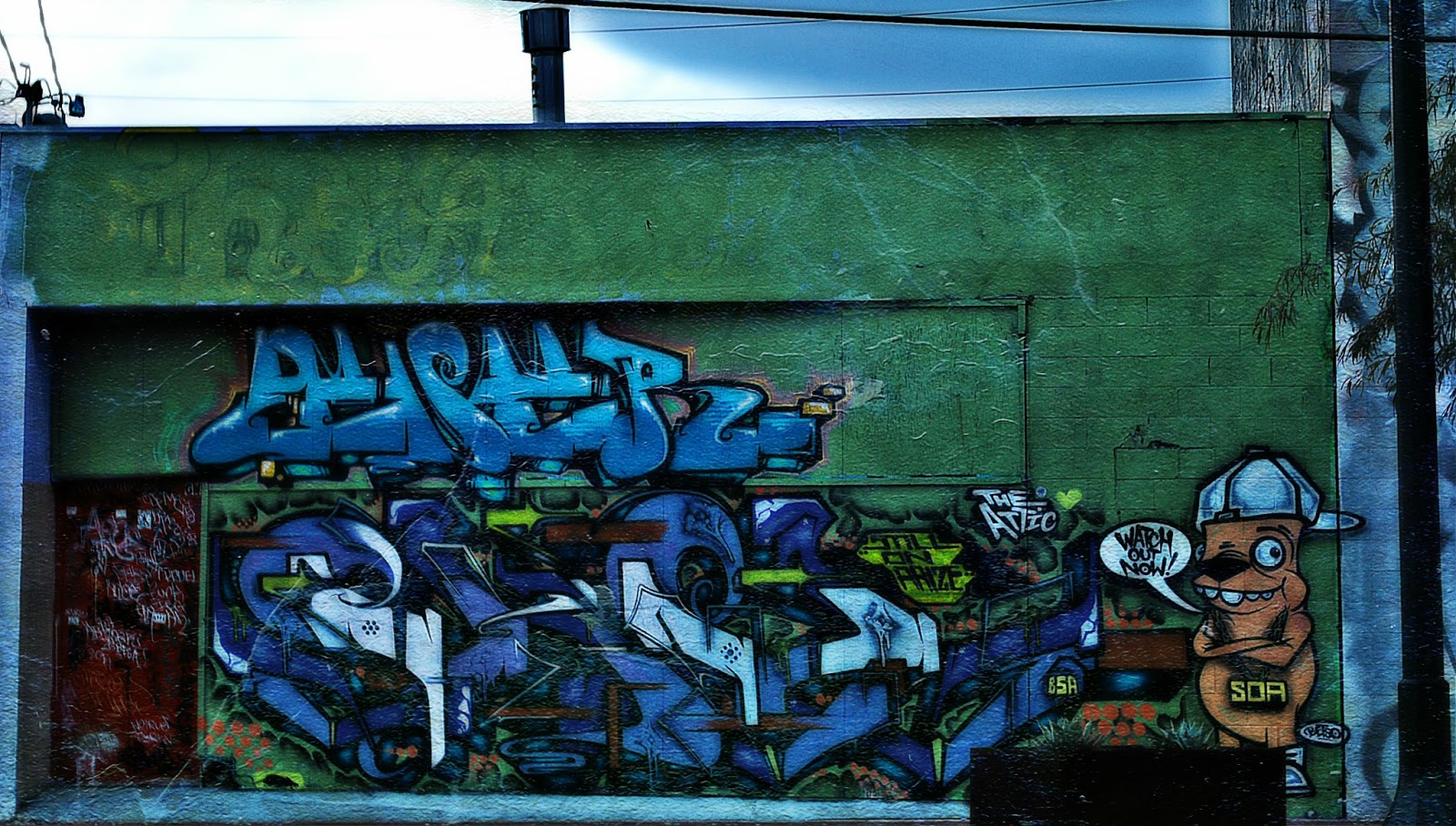
GrAFfiTi!


I took this photo about a month ago.  The area where I have a little boutique at is in The Arts District of Las Vegas.  There are photographers constantly shooting all around us.  This wall gets a lot of attention along with another one down the street and around the corner of us (also inside the garden area of our shop).  

I decided I'd take a photo of the wall (unfortunately we had some "taggers" ruin the wall and it's painted a solid color with nasty tagging on it now)...if I get a chance I'll take another photo and post it here too.

I don't remember everything I did, but I do know I added a glamour glow affect and Pixel Dust Photo Art's texture, "Other Worlds" using blending mode "hardlight" at 100%, erased the texture from the sky area because it just didn't fit.

If you want to know more about Photo Art Friday click on the picture below!

Photo Art Friday

Capture Life!

UPDATE:  Here is the most recent photo of the wall from above.  I'm sure some will still say it's art and that's fine, but I'd rather look at the other wall.


Friday, March 1, 2013

Today is...

Photo Art Friday!

Here is my submission...

The theme this week is "Vintage" and we're to use fabulous Bonnie's free texture "Antique Me".

Unfortunately, I didn't write down exactly what I did with this photo except that I lowered the saturation, went into curves and warmed the photo up a bit and added a vintage filter and the texture.

These are just three of the tea pots that we make in a series called "Treacherous Tea Pots".

Click on the image below to find out more about Photo Art Friday and to visit others work.

Photo Art Friday

Thursday, January 10, 2013

Day 10 ~ One O' Clock

Today's challenge is "one o'clock"...I wasn't sure what to do because I figured most would be taking a photo of a clock or along those lines and I had to be at work at 1 today.  So this is what I came up with...

Yep...that's me taking a photo of my shop's door heading into work at 1 o'clock!

If you're interested in joining in on the fun click here for the list.

Capture life!

Friday, March 16, 2012

Photo Art Friday - March 16

This weeks options are:

• Any photo art of your choice you'd like to hang
• Photo art with some sort of hidden element in plain sight (encore from last week)
• or highlighting the color "green" for St. Patty's Day!

Well, I went for 2 out of 3 to work on for this week's challenge.


My idea came from a thought in my head, "every picture tells a story".  So, I thought I'd share a bit of me...parts of my story.  Also was able to slip in the green too.

Please forgive me, for I did not write down everything I did.  I did, however, start my project off using Bonnie's "Artist Texture 1" texture.  I chose the photos I wanted to use and made them either b/w or sepia tone, so their colors would not interfere.  Each one I added at different blending modes either "lighter", "overlay", or "multiply" lowering the capacity.  I did use another texture, but for the life of me can't remember whose it was, but when I do find it again, I'll make a note on here.

If you're interested in "Photo Art Friday" then head over to Bonnie's blog to learn more or simply click on the artful box below.

Capture Life!


Photo Art Friday

Thursday, March 8, 2012

Photo Art Friday

It's been a while since I've participated in Bonnie's "Photo Art Friday" challenge.  This weeks challenge we have a choice of either making our own photo art using at least one of her textures or a piece of photo art that has elements 'hidden in plain sight'.

I decided to give myself a bit of a challenge, mainly because I just loved the examples she used to show us, and I needed a good challenge.  Let me tell you it was a challenge for me, I was really having a hard time trying to come up with some type of theme or what to put in as "hidden elements".

This is what I came up with...


Here are the two main photos I used for this challenge:


I also used Bonnie's fabulous free texture "Dreams of Spring".

If you're interested in Photo Art Friday click on the gorgeous button below.

Capture Life!


Photo Art Friday

Saturday, February 18, 2012

Photo Art Friday

I'm only a day late at posting and joining this wonderful challenge.  I'm just sorry that I haven't had time to practice "masking" for this week, but hopefully this coming week I'll find more time to play.

Here is my submission for this weeks challenge, you are able to submit a piece of your photo art of your choice...

Run mouse over to see original photo

I've been learning a new technique "painter".  I've only been practicing using this method for about a week now (have so much to learn) but I think this looks pretty good considering.  I so need to purchase a Wacom...sigh.  It's really hard with a mouse, but then I've never used one of those tablets either.

If you would like to know more about Photo Art Friday click on the button below.


Photo Art Friday


Come join the fun!

Capture Life!

Friday, September 16, 2011

Week 2 - Photo Art Friday

My how time flies.  It seems like yesterday that I did a post on the very first week of this challenge.  It's here again and I've had so much fun creating a piece of "photo" art.  I hope you'll enjoy it as well.

 Run your mouse over to see the before shot

I took this photo at a car show at Don Laughlin's Riverside Hotel and Casino.  This one was in the showroom out front.  If you went inside the casino and upstairs there were hundred more cars and motorcycles of all sizes, age...you name it. 

Now how I came about the editing process:
  1. I cropped the image and adjusted the Bright/Contrast levels.
  2. Added a cross processing effect in GIMP.
  3. In PSP (Paint Shop Pro) I used Pixel Dust Photo Art texture Dream Overly.
  4. I flipped the texture image and used blend mode Difference @ 100%
  5. Then I merged all the layers down.
  6. I duplicated the image
  7. Created a "New Layer Group"
  8. Click on adjust - Blur - Gaussian Blur at 15%
  9. Changed the blending mode to Overlay at about 93%, that's what gives it an "Orton" finish look to it.
    If you're interested in Photo Art Friday, then click on the button below.  Even if you're not, be sure to check out all the other fabulous "Photo Art" from other photographers...you'll be very inspired.


    Photo Art Friday

    Tuesday, September 6, 2011

    Texture Tuesday - Cracker Jack eDition


    This weeks challenge is to use Kim Klassen's Cracker Jack texture that she graciously gave to us...Free! 

    My process: blending mode Exclusion 100%
                       blending mode Color Legacy 53% 
                       blending mode Multiply 100% erasing some texture from martini glass.

    I really wanted to try something a little different.  The martini is actually a Sour Apple Martini, but using the exclusion turned all the colors in the photo different, giving it a more artistic feel to it or at least that's what I think.

    If your interested in Texture Tuesday or like to be inspired (like I do) by other fabulous photography then head over to Kim's blog and check them all out.

    Thursday, April 7, 2011

    Texture Tuesday

    I know its not Tuesday, but Kim Klassen gave us a fabulous texture to use and I wanted to share mine.

    Treacherous Tea Set

    The texture is called Warm Sun, by Kim Klassen. 
    If you're interested in textures, be sure to sign up on her blog.
    

    Just listed....

    Ametista's Dark Home Decor presents...
    Spring time with a bit of a twist.

    Click on images to see more photos.


    Head on over to see more of our Spring apothecary collection

    Friday, March 18, 2011

    First Debut of what's to come....

    in Ametista Dark Decor....

    Apothecary bottles...

    a set of candle votives.

    So be sure to visit Ametista for more pictures and information next week!

    Also if you're a fan of ours on Facebook, you'll receive 25% off your total order and if you're not one it's really easy to become one...just click on the Facebook button on the side bar.

    Friday, March 11, 2011

    Things I've been working on

    I've been playing in Elements 9, due to the part of a "free" SkinnyMini ECourse on it.  You can find the button on my side bar to Kim Klassen's blog page chocked full of photography tips, tricks and so much more.  She is fantastic!  I'm totally addicted to her blog, for photography is a true passion of mine.  Anyway, this course was about "Textures", so I just wanted to share some of my photo editing skills with you...keep in mind, I'm a newbie...:D

    Desert Wild Flower (daisy family)

    I love taking photos of flowers or pretty much anything with nature, as you will see in the next couple of pictures.

    African Moon Daisy


    Daisy
    (Ok, so Daisies are my favorite flowers)

    This one was taken on our trip to San Francisco.


    I'm still learning and playing with different options and textures, but I hope you've enjoyed these.

    Bright blessings!