Showing posts with label photo art friday. Show all posts

Friday, April 12, 2013

Shadow and Light Challenge

Photo Art Friday


I had to dig through my archives to find a photo for this weeks challenge.  I added Bonnie's texture "Age it" on blending mode Hardlight at 87%.

For more information on Photo Art Friday, click here.

Capture life!

Friday, April 5, 2013

Collage

Photo Art Friday
Challenge is
Collage


Since I was in a hurry to get this in, I took the easy way in making my collage this week.  I first opened up Pic Monkey "collage" and added my photos, moving the slider where there was no spacing.  Then I went into Pixlr Editor added a few different textures (sorry can't remember the names of them) and added Ruby Blossom's clock texture (that's the only one I can identify :).  I added a glamour glow affect and a grunge ripped paper from Pixlr Express.  I also added the quote in Pic Monkey.

Check out more of  Pixel Dust Photo Art's Photo Art Friday challenge by clicking below.

Photo Art Friday

Thursday, March 28, 2013

Photo Art Friday

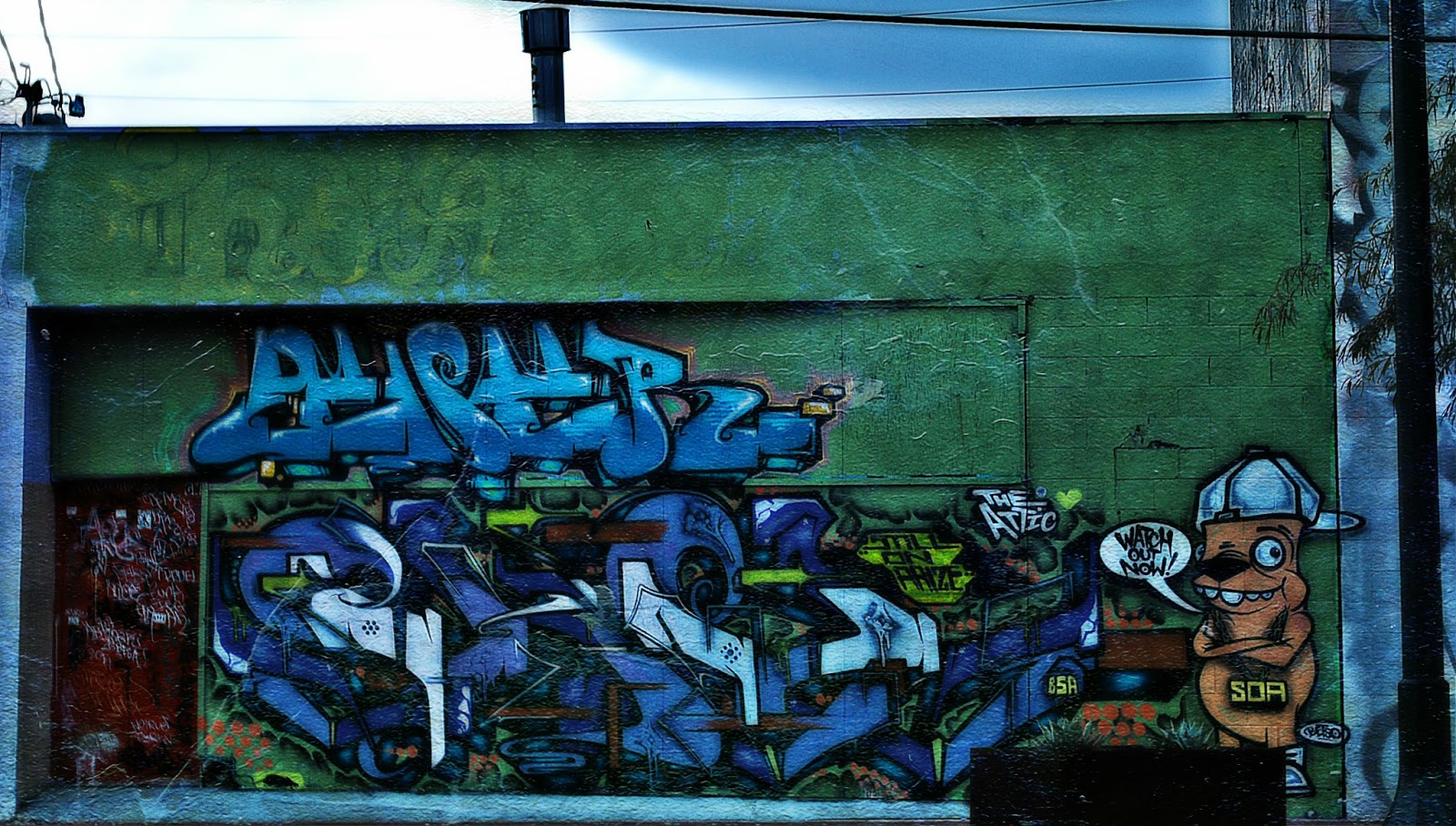
GrAFfiTi!


I took this photo about a month ago.  The area where I have a little boutique at is in The Arts District of Las Vegas.  There are photographers constantly shooting all around us.  This wall gets a lot of attention along with another one down the street and around the corner of us (also inside the garden area of our shop).  

I decided I'd take a photo of the wall (unfortunately we had some "taggers" ruin the wall and it's painted a solid color with nasty tagging on it now)...if I get a chance I'll take another photo and post it here too.

I don't remember everything I did, but I do know I added a glamour glow affect and Pixel Dust Photo Art's texture, "Other Worlds" using blending mode "hardlight" at 100%, erased the texture from the sky area because it just didn't fit.

If you want to know more about Photo Art Friday click on the picture below!

Photo Art Friday

Capture Life!

UPDATE:  Here is the most recent photo of the wall from above.  I'm sure some will still say it's art and that's fine, but I'd rather look at the other wall.


Friday, March 22, 2013

Photo Art Friday

Self Portrait

...in the eyes of the beholder.

I shot a photo of myself and then cropped only the top half of my face (well a little less) added Bonnie's fabulous free texture "Beauty is" on blending mode hardlight at 100%.  But thought it needed a bit more I used the art poster effect from Pixlr Editor and wanted more artistic flare, went into Pixlr Express and used the creative express "Yin" to give it the layered look it has then added a grunge like frame.  

Pixlr's photo editing is a free editing program in case you didn't know or are interested.

I'm happy with the results.

If you're interested in Bonnie's Photo Art Friday or to check out her wonderful textures click here.

Thanks for stopping by!

                                                                                Capture Life

Friday, March 15, 2013

Portrait

Photo Art Friday!

Our theme this week is "Portrait"...


This is a photo of my son.  We were on vacation in Lake Tahoe and walking around the town.  We were at a cross walk waiting for the light to change and I took advantage of the opportunity to take the "shot".

I took the saturation down added a soft brown filter and added Skeletal Mess grunge texture.

If you're interested in Photo Art Friday...click on the picture below.

Photo Art Friday

Monday, March 11, 2013

Creating...

I didn't get my post made in time for Photo Art Friday, but I still wanted to post my picture I worked on anyway.  We were to use one of her textures and make a collage or any photo art we choose.

I took 4 photos of my own along with one of Bonnie's texture (which now I can't remember exactly which one...sorry).

  I then went into Pixlr Express and chose "white ripped" to add the rip paper look.

Today, I was looking through some photos of mine that I haven't edited yet and played around with curves, filters and different modes....


Here is the original...


I just love playing around in photo editing programs, it's amazing all the things you can do...especially if you're just being creative.

I hope to see everyone at the next Photo Art Friday!

Capture Life.

Friday, March 1, 2013

Today is...

Photo Art Friday!

Here is my submission...

The theme this week is "Vintage" and we're to use fabulous Bonnie's free texture "Antique Me".

Unfortunately, I didn't write down exactly what I did with this photo except that I lowered the saturation, went into curves and warmed the photo up a bit and added a vintage filter and the texture.

These are just three of the tea pots that we make in a series called "Treacherous Tea Pots".

Click on the image below to find out more about Photo Art Friday and to visit others work.

Photo Art Friday

Saturday, February 16, 2013

Photo Art Friday

Once again a day late...but I still made it!

This weeks challenge is to use any photo art of your choice or to use Pixel Dust Photo Art's free texture "Bamboo Dreams".  I loved the texture and chose to do use it.

I lowered the saturation and then used a Cross Process filter added the texture using blending mode overlay at approximately 85%.  I then used one of Jerry Jones' textures "Black Box overlay" on Screen blending mode at 100%.  I added another filter "Vintage" over the whole thing.

Capture life!

Saturday, February 9, 2013

Photo Art Friday

This weeks challenge is to use Pixel Dust Photo Art's fabulous free texture, "Dropped Petal" another one of PDPA's texture and use one or two images of your own/one you can get from the web for free.  You can as always use any photo art of your choice.

Here's my first attempt:
I started off with the texture, dropped petal and added my two photos, 1) leaves on a tree, 2) a church steeple, both at blending modes overlay anywhere from 85% - 100% (I can't remember).  I then added PDPA's texture "leafy landscape" blending mode overlay 100%.

I thought it needed a little something so I added another photo of mine 3) seagulls
using blending mode difference at approximately 95%.
 
It really changed the whole photo.  Here are the actually photos I used...


Be sure to go to Pixel Dust Photo Art blog to see more fabulous photo art, click here.

Capture Life!

Friday, January 25, 2013

Photo Art Friday

This weeks challenge is the word "hardware" definition: the mechanical equipment necessary for conducting an activity,         usually distinguished from the theory and design that make the activity possible.  Or you can post any photo art of your choice.


I used Pixel Dust Photo Art's texture "Age it" and Kim Klassen's "Wonderful Magic Screen" then I used blending mode "difference" at 100%.

Head over to Pixel Dust Photo Art blog to see more amazing photo art or to learn more about Photo Art Friday!

Capture Life!

Friday, November 9, 2012

Lines - Photo Art Friday

This weeks challenge is "lines" and of course any photo art of your choice.  I didn't have enough time to take a new shot for this challenge (as much as I wish I could have), so I had to look at some of my photos I've already taken.  

The photo I chose, I took while I was visiting my sister in Texas. 


I first added a soft blend script to the photo then went into my instant effects and added the "tone map high".  I used one of Bonnie's fabulous free textures, "Other Worlds" Overlay mode, blend at 100% and lastly I added a little vignette.

After all the processing, not sure if you can see or even notice the seagull flying by the Ferris Wheel.

If you're interested in Photo Art Friday click here.   Please be sure to stop by Bonnie's blog, Pixel Dust Photo Art, to see not only her work, but today's photos of this challenge.

Capture Life!

Friday, October 19, 2012

Linking up with...

Photo Art Friday

Our challenge this week is to use Bonnie's fabulous free texture, "Leafy Landscape" with any of our photos.


For more information on  Photo Art Friday and to see more wonderful photography go to Pixel Dust Photo Art blog.

Capture Life!

Thursday, June 21, 2012

Vintage ~ Photo Art Friday

This week our challenge is to turn a photo so it has a vintage look/feel to it.  I hope I accomplished it with this photo.


I used Bonnie's free texture "Vintage Craquelure" on blending mode Multiply approximately 80%.  I first I brought the color down using the curve tool, then added the texture, I also added another texture through PicMonkey, then a grunge like frame around the whole thing.

Click below to see more photography art and to visit Bonnie's fabulous blog.


Photo Art Friday

Friday, June 15, 2012

Photo Art Friday

This week our challenge is "negative" space...or of course any piece of photo art you'd like to share this week.


This is a photo I took back in the later part of winter.  Since here in Las Vegas, our winters are pretty short (some would say we don't really have a winter).  I was really surprised of how early the Yochino Cherry trees were already blooming.  There was a whole row of them.

I used Bonnie's free texture "Mother Love" on blending mode Overlay at approximately 87% erasing some of the texture off the flowers and a little bit off the leaves.  Then I did a little bit of a Cross Processing on it.

If you'd like more information on you can participate in Photo Art Friday, click here.

Wishing all a fabulous weekend and a "Happy Father's Day".

Capture Life!

Friday, June 8, 2012

Black and White


Turned photo in to black and white then added Bonnie's "OAS Notes to Myself" texture.

For more information click on the box below.


Photo Art Friday


Friday, June 1, 2012

Photo Art Friday - Bokeh

Our challenge this week is as usual any piece of photo art of your choosing or a piece with "bokeh" (a Japanese term for the subjective aesthetic quality of out-of-focus areas of a photographic image).

I've decided to submit two photos this time.  The first one was taken several years ago during out trip to San Diego Wild Animal Park.  


There were only the usual editing done on this photo.

I took this next photo a couple of days ago in my backyard, after reading "8 Things You Didn't Know Your DSLR Could Do"...I did learn a few extra things and some my camera will not do (which is a bummer).  What I did learn was doing "custom settings" on my camera.  So I did a little adjustment and went outside to try it out...


The changes I made in my custom settings were to balance for a truer color, sharpness, basically to have to do less post processing.  But as you can see in this photo I did some fun editing as well.  I edited it in PicMonkey using "focal zoom" then I added Bonnie's new FREE texture "soft light overlay" and "light blue painterly" (another freebie).  Then I added a slight vignette around the whole photo.  The "soft light overlay" added the "bokeh" in this photo, it is very light.

If you want to join in on the fun click on the button below...or if you'd just like to check out what other photographers/artists have come up with.


Photo Art Friday


Capture Life!

Thursday, May 24, 2012

Abstract Photo Art

It's that time again...and I'm a day early!


This week our challenge is a piece of abstract photo art created with a design from nature or of course any piece of photo art you choose.

Roll mouse over to see original


I used Bonnie's texture "Dreams of Spring" blending mode Difference approximately 90% and also used a texture called "Hauntings" by Jerry Jones blending mode Darken at approximately 75%, then I did an Orton finish on it through PicMonkey.

Be sure to check out all the entries over at Pixel Dust Photo Art blog or join in on the fun and share your photo art with us.

Capture Life!

Friday, May 18, 2012

Lines, Angles or Graphic Elements...


This week our challenge is lines, angles or graphic elements and of course any piece of photo art you'd like to do.

I chose a photo using lines and angles.  I added a texture by PixelDustPhotoArt, Yesteryear, using blending mode Overlay at about 80% and also one called Sheet music fairy, using the blending mode Multiply approximately 70%.


Please check out the other talented people over at PixelDustPhotoArt or for more information on Photo Art Friday.

Capture Life!

Friday, May 11, 2012

Horizon

Photo Art Friday


Las Vegas Strip

1.  Cropped photo
2.  Did a little "auto" adjustment
3.  Added Bonnie's texture "Heavenly" 100% blending mode Subtract
4. Added Bonnie's texture "Golden Orb" 100% blending mode Difference

I actually took this photo during day, but using these two textures and blending modes made it look like I shot this when the sun was going down.  I really like the way this turned out.

Our challenge this week was either to link any piece of photo art we choose or photo art that features a "horizon".

If you're interested in Photo Art Friday, click here...or just head over and see what everyone is hanging in the virtual gallery, there are so many talented artists.

Capture Life!

Thursday, April 19, 2012

Photo Art Friday

Yeah...I made it!

I'm joining in on the fun over at Pixel Dust Photo Art for Photo Art Friday.  We have the choice of posting any piece of photo art we please or a piece with the theme "new life" (interpret anyway you wish). 


I cropped the picture just a bit (mainly because some of my hair fell in the shot).  I  edited this in Picmonkey using "Focal blend" to give it that funky focus and then I added Bonnie's "Happy Day" texture blending mode Multiply at 100%, lastly I added a vignette.

Come join the fun...you have until Sunday to get your submissions in, see you there!

Capture Life!